TL;DR
We recently took a look at AnyDesk 9.7.10 and found that its first-stage executable uses several techniques we normally see during malware analysis:
- PEB walking.
- An empty import directory.
- Encrypted API names.
- Runtime export resolution.
- A large encrypted and compressed PE image.
- Pages made writable and executable.
- An inner loader that applies relocations and repairs its own IAT.
The list could describe a packed implant, but here it belongs to a correctly signed remote-access product. This makes the file a useful malware-analysis exercise.
We will follow the small first stage until it recovers the 30 MB application hidden inside it. Along the way, we will introduce each concept when the loader needs it.
The full picture
When downloaded from the official AnyDesk Windows page, the signed executable is only about 8 MB. Its job is to reconstruct a much larger inner PE. At a high level, the startup path has two stages:
Signed AnyDesk.exe (8,343,992 bytes)
  |
  +-- Stage 1: PEB walk + EAT bootstrap
  |      |
  |      +-- LCG-XOR decrypts names and payload
  |      +-- LZMA decode + x86 BCJ reversal
  |      +-- copy headers and sections into reserved .itext
  |
  +-- Raw inner PE (30,489,600 bytes)
         |
         +-- Stage 2: relocations + imports + protections
         +-- enter the AnyDesk application
The stages divide the normal work of the Windows image loader:
| Responsibility | Outer stage | Inner stage |
|---|---|---|
| Find a bootstrap module without imports | Yes | No |
| Resolve a small native API surface | Yes | Uses supplied callbacks |
| Decrypt and decompress the embedded PE | Yes | No |
| Copy PE headers and sections by RVA | Yes | No |
| Apply base relocations | No | Yes |
| Load 23 dependencies | No | Yes |
| Resolve 767 imports and repair the IAT | No | Yes |
| Set final per-section protections | No | Yes |
| Enter the real application | No | Yes |
This is not classic Reflective DLL Injection because no remote process is involved. It is better described as a program manually rebuilding an image inside its own address space.
First look
Before opening a decompiler, we checked that we were all looking at the same sample:
| Property | Observed value |
|---|---|
| Product version | AnyDesk 9.7.10 |
| Architecture | PE32 / x86 |
| File size | 8,343,992 bytes |
| SHA-256 | 46872febd9684df716d392b457aef6611ae7b8716d2ece6bca30fb97271bce1d |
| Authenticode status | Valid |
| Signer | AnyDesk Software GmbH |
| Certificate validity | 11 February 2026 to 13 February 2027 |
| Outer import directory | Empty |
Function names used below are labels we assigned during analysis; the binary is stripped. The assembly excerpts have also been cleaned up by removing sample-specific addresses while leaving the relevant instructions intact.
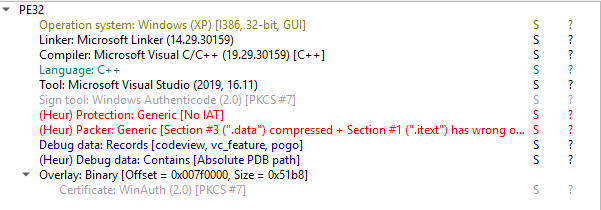
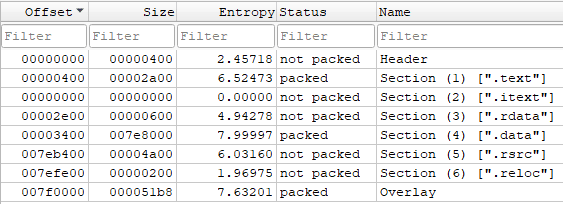
Using DiE, we can already see
properties we would expect from a packer: an empty import directory, a
high-entropy .data section, and an .itext section that occupies memory but
has no bytes on disk.
High entropy alone cannot tell us whether data is compressed, encrypted, or
simply unusual. It does tell us where to look next. In this sample, almost all
of the file's high-entropy bytes sit in .data.
Given AnyDesk's functionality and the small amount of visible code, our working
hypothesis is that .data contains the real application in some transformed
form.
The section table supports that hypothesis:
| Section | Virtual size | Raw size | Characteristics |
|---|---|---|---|
.text |
0x296D |
0x2A00 |
0x60000020 |
.itext |
0x1D33C00 |
0 |
0xC0000080 |
.rdata |
0x434 |
0x600 |
0x40000040 |
.data |
0x7E8344 |
0x7E8000 |
0xC0000040 |
.rsrc |
0x4878 |
0x4A00 |
0x40000040 |
.reloc |
0x84 |
0x200 |
0x42000040 |
This gives us three useful observations:
.textcontains only about 10 KB of loader code..datacontains almost all the bytes that occupy disk space..itextoccupies no raw file bytes, yet asks the image mapping for 30,620,672 bytes of zero-backed virtual space.
The entry point sits inside the tiny .text section. From here, we can follow
the loader in the same order it solves its own problems.
PEB walking
The first problem appears immediately: the executable has no normal imports. To understand why that matters, we need a short detour into how Windows normally connects a program to DLL functions.
Why the IAT matters
A regular PE contains an Import Directory. It tells Windows which DLLs the program needs and which functions it wants from each one. For every imported function, the loader resolves the real address and writes it into the Import Address Table, or IAT.
At source level, a program may contain:
VirtualProtect(address, size, PAGE_EXECUTE_READWRITE, &old_protection);On 32-bit Windows, the compiled call often looks conceptually like this:
call dword ptr [__imp__VirtualProtect@16]__imp__VirtualProtect@16 is an IAT slot. Before the program starts, Windows
replaces that slot with the real address of VirtualProtect inside
kernel32.dll.
PE import descriptor
  -> "kernel32.dll"
  -> "VirtualProtect"
  -> Windows resolves the export
  -> Windows writes its address into FirstThunk / the IAT
  -> the program calls through that slot
In this AnyDesk file, the Import Directory is empty. There is no
loader-populated slot for VirtualProtect, GetProcAddress, or even
GetModuleHandleW. This first stage has no normal imported functions for
Windows to bind.
This creates a bootstrap problem:
No imports -> no GetProcAddress
No GetProcAddress -> no easy way to resolve another API
The way out is to use information Windows has already placed in the process.
Following the PEB
Every thread has a Thread Environment Block, or TEB. Every process also has a Process Environment Block, or PEB. Among other things, the PEB points to loader data containing a linked list of the modules already loaded in the process.
On 32-bit Windows, the FS segment gives code access to the current TEB.
AnyDesk's helper is only two instructions:
mov eax, dword ptr fs:[0x18]  ; current TEB
ret
The caller follows the rest of the chain:
call get_teb                 ; helper above
mov  eax, [eax+0x30]         ; TEB->ProcessEnvironmentBlock
mov  esi, [eax+0x0C]         ; PEB->Ldr
add  esi, 0x0C               ; &Ldr->InLoadOrderModuleList
mov  edi, [esi]              ; first LIST_ENTRY (Flink)
That is PEB walking in its simplest form: follow pointers through structures that Windows already initialized.
The same logic can be written in C-like code. This is deliberately 32-bit-specific and mirrors the offsets used by this sample:
static void *find_ntdll_base(void) {
    uint32_t teb  = __readfsdword(0x18);
    uint32_t peb  = *(uint32_t *)(teb + 0x30);
    uint32_t ldr  = *(uint32_t *)(peb + 0x0c);
    uint32_t head = ldr + 0x0c;

    // AnyDesk decrypts this value at runtime.
    wchar_t *wanted = decrypt_wide_name(
        encrypted_ntdll, 10, 0x3114b604);  // -> L"ntdll"

    for (uint32_t entry = *(uint32_t *)head;
         entry != head;
         entry = *(uint32_t *)entry) {

        wchar_t *base_name = *(wchar_t **)(entry + 0x30);

        // Five UTF-16 characters = 10 bytes.
        if (local_memcmp(base_name, wanted, 10) == 0)
            return (void *)*(uint32_t *)(entry + 0x18);
    }

    return NULL;
}
AnyDesk does not import memcmp for this either. The first stage contains its
own small byte-comparison routine.
The relevant part of the real loop looks like this:
module_loop:
push 0x0A                 ; decrypt 10 bytes
push encrypted_ntdll
push ntdll_seed
call decrypt_wide_name    ; produces L"ntdll"
push 0x0A                 ; comparison length
push eax                  ; decrypted name
push dword ptr [edi+0x30] ; BaseDllName.Buffer
call local_memcmp
test eax, eax
je   module_found
mov  edi, [edi]           ; entry = entry->Flink
cmp  edi, esi             ; back at list head?
jne  module_loop

module_found:
mov edi, [edi+0x18]       ; LDR entry -> DllBase
So the purpose is very concrete: obtain the base address of ntdll.dll without
calling an imported API and without relying on an IAT.
If you want to explore the same structures interactively in WinDbg, the ired.team PEB walkthrough is an excellent companion. It shows the PEB, loader data, and module lists from the debugger's point of view.
The offsets above are not a portable Windows API. Microsoft treats these as internal structures, and the values differ between 32-bit and 64-bit processes. They are correct for this x86 sample and explain exactly what its instructions are doing.
Why this matters
Seeing fs:[0x18] alone is not enough to classify anything as malware. The
important pattern is what happens next:
read TEB
  -> reach PEB loader data
  -> walk loaded modules
  -> recover ntdll base
  -> treat that base as a PE
  -> parse its exports
We now have the address of a DLL, but not yet the address of a function inside it. That leads naturally to the next step.
Resolving APIs
The opposite side of an import is an export. A DLL's Export Address Table (EAT) describes the functions that DLL makes available to other code.
Because AnyDesk cannot call GetProcAddress yet, the first stage performs the
lookup itself.
Walking the EAT
Once edi contains the base of ntdll, the first stage parses it as a PE:
mov eax, [edi+0x3C]       ; DOS.e_lfanew
mov eax, [eax+edi+0x78]   ; Export Directory RVA
add eax, edi              ; IMAGE_EXPORT_DIRECTORY *
mov ecx, [eax+0x1C]       ; AddressOfFunctions
mov edx, [eax+0x20]       ; AddressOfNames
mov ecx, [eax+0x24]       ; AddressOfNameOrdinals
It then walks the exported names until it finds
LdrGetProcedureAddress. The target name is decrypted just before comparison:
mov esi, [edx+ebp*4]      ; name RVA
add esi, edi              ; exported name
call decrypt_ascii_name   ; -> "LdrGetProcedureAddress"
call local_strcmp
...
movzx eax, word ptr [ordinals+ebp*2]
mov   eax, [functions+eax*4]
add   eax, edi            ; final function address
In cleaned-up C, the same lookup is easier to read:
static void *resolve_export(uint8_t *module, const char *wanted) {
    IMAGE_DOS_HEADER *dos = (IMAGE_DOS_HEADER *)module;
    IMAGE_NT_HEADERS32 *nt =
        (IMAGE_NT_HEADERS32 *)(module + dos->e_lfanew);

    DWORD export_rva =
        nt->OptionalHeader
          .DataDirectory[IMAGE_DIRECTORY_ENTRY_EXPORT]
          .VirtualAddress;

    IMAGE_EXPORT_DIRECTORY *exports =
        (IMAGE_EXPORT_DIRECTORY *)(module + export_rva);

    DWORD *names = (DWORD *)(module + exports->AddressOfNames);
    WORD *ordinals =
        (WORD *)(module + exports->AddressOfNameOrdinals);
    DWORD *functions =
        (DWORD *)(module + exports->AddressOfFunctions);

    for (DWORD i = 0; i < exports->NumberOfNames; i++) {
        char *name = (char *)(module + names[i]);
        if (local_strcmp(name, wanted) == 0) {
            WORD ordinal = ordinals[i];
            return module + functions[ordinal];
        }
    }

    return NULL;
}
Once LdrGetProcedureAddress is available, the bootstrap becomes much easier.
AnyDesk uses it to resolve the rest of its small ntdll table, including
LdrLoadDll, NtProtectVirtualMemory, and NtMapViewOfSection. It then obtains
kernel32.dll and resolves functions such as HeapAlloc,
GetProcessHeap, VirtualProtect, and GetModuleHandleW.
PEB walk
  -> ntdll base
  -> manual EAT lookup
  -> LdrGetProcedureAddress
  -> remaining ntdll functions
  -> LdrLoadDll / kernel32
  -> heap, command-line, module, and protection APIs
Encrypted names
It is tempting to call every resolver like this “API hashing,” but that would be wrong here.
API hashing stores a fixed integer for each desired function. The resolver hashes every exported name and compares integers. AnyDesk instead stores reversible encrypted bytes, decrypts them, and performs normal string comparisons.
We recovered, among others:
ntdll
kernel32
LdrGetProcedureAddress
LdrLoadDll
NtProtectVirtualMemory
HeapAlloc
VirtualProtect
GetModuleHandleW
The distinction matters during analysis. Hashing asks us to reproduce a hash algorithm. This sample asks us to reproduce a keystream.
Decrypting data
The name-decryption helpers and the large payload use the same basic construction: a linear congruential generator, or LCG, produces one key byte at a time, and that byte is XORed with the ciphertext.
state = state * 0x0019660D + 0x3C6EF35F
key   = (state >> 12) & 0xFF
plain = cipher XOR key
The state update is deterministic and each seed is present in the first-stage code.
The payload loop
This is the complete payload-decryption loop from the sample, with addresses replaced by labels:
push esi
mov  edx, data_section      ; start of .data in memory
mov  ecx, 0x0000727F        ; seed
mov  esi, encrypted_size    ; encrypted byte count

decrypt_loop:
imul ecx, ecx, 0x0019660D
add  ecx, 0x3C6EF35F
mov  eax, ecx
shr  eax, 0x0C
xor  byte ptr [edx], al
inc  edx
sub  esi, 1
jne  decrypt_loop
pop  esi
ret
At a higher level it would be expressed like this:
static void decrypt_payload(uint8_t *data) {
    uint32_t state = 0x727f;

    for (uint32_t i = 0; i < 0x7e7f32; i++) {
        state = state * 0x0019660d + 0x3c6ef35f;
        data[i] ^= (uint8_t)(state >> 12);
    }
}
This is obfuscation, not secure cryptography. The algorithm, seed, and ciphertext are all present in the file, and there is no authentication tag. Still, it achieves several useful effects for a packer: strings disappear, the payload no longer has a recognizable header, and basic import or signature scans reveal little about the real application.
Decompressing data
Decrypting the blob only exposes the next layer: a compressed stream.
AnyDesk uses LZMA (Lempel-Ziv-Markov chain Algorithm), the compression algorithm best known from 7-Zip. LZMA combines dictionary matching with range coding. It is slower and more memory-hungry than simpler formats, but it often produces a high compression ratio, which is useful when a vendor wants to ship a large application inside a much smaller wrapper.
This is a raw LZMA1 stream rather than a .7z or .xz container. A container
would normally carry descriptive metadata for us. A raw decoder instead needs
the LZMA model properties, dictionary size, compressed input, and expected
output size. In this sample, the stream has no end marker, so the known output
size also tells the decoder when to stop.
How we know the properties
After the XOR loop, the decrypted .data begins with:
5D 00 00 00 04Those five bytes use the layout expected by the LZMA SDK:
The first byte packs
lc,lp, andpb:textproperty = (pb * 5 + lp) * 9 + lc 0x5D = (2 * 5 + 0) * 9 + 3lccontrols how many high bits of the previous literal provide context,lpadds low position bits to the literal context, andpbcontrols the position model used for matches.The next four bytes are a little-endian dictionary size. Here,
00 00 00 04means 64 MiB.
| Field | Value |
|---|---|
lc, lp, pb |
3, 0, 2 |
| Dictionary size | 64 MiB |
| Compressed bytes after properties | 0x7E7F2D |
| Expected output size | 0x1D13C00 (30,489,600 bytes) |
These values are not a guess based only on the bytes. The first-stage code decrypts the payload, treats its first five bytes as a properties block, passes the remaining bytes to its LZMA decoder, and allocates the expected decoded size. The standard property layout, the caller's arguments, and the successful 30,489,600-byte decode all agree.
The first-stage orchestration shows the order directly:
call decrypt_payload
mov  ebx, decoded_size
call heap_alloc
...
call lzma_decode
...
push esi                 ; decoded buffer
call x86_bcj_convert
                         ; raw PE is ready after this returns
The BCJ step
LZMA output is not quite final. AnyDesk also uses the standard x86 BCJ branch converter.
Near x86 CALL and JMP instructions, usually identified by opcodes E8 and
E9, store a signed 32-bit displacement relative to the end of the
instruction:
target = address_after_instruction + relative_displacement
relative_displacement = target - address_after_instruction
That representation is convenient for execution but awkward for compression. Two call sites that reach the same function usually contain different displacement bytes because the call instructions sit at different positions. LZMA therefore sees fewer repeated byte sequences than the source code's structure would suggest.
Before compression, the BCJ encoder scans for eligible E8 and E9
instructions and converts their relative operands into position-normalized
values. Conceptually:
packing:   normalized_operand = relative_displacement + position_after_instruction
unpacking: relative_displacement = normalized_operand - position_after_instruction
The real converter also checks operand ranges and high bytes so it does not
blindly rewrite every E8 or E9 byte it encounters. The normalized values
make branches to related targets look more alike, which gives LZMA better
matches. BCJ does not compress anything by itself and it does not provide
confidentiality; it is a reversible pre-processing filter.
After LZMA decoding, those normalized operands still need to be converted back
or the program's control flow would be wrong. The routine in this sample
matches the LZMA SDK's x86_Convert design and is called with its encoding flag
set to zero, meaning decode.
Getting the real PE
There are two practical ways to recover the inner executable.
The static route follows the transformations we just identified:
encrypted payload bytes from .data
  -> LCG-XOR with seed 0x727F
  -> read the five-byte LZMA properties block
  -> raw LZMA decode to 0x1D13C00 bytes
  -> x86 BCJ reversal
  -> raw PE32 file
The dynamic route is shorter. A debugger can stop immediately after the BCJ routine returns and dump the completed output buffer from memory. That recovers the same file. We mention this as an alternative verification route without turning the article into a step-by-step dumping guide.
The recovered file verifies as:
| Property | Value |
|---|---|
| Size | 30,489,600 bytes |
| MD5 | c280dca9bf3927c8238854cf9dbc62e3 |
| SHA-1 | 5840c5218c0c31d82b1b4308a0979f384b76b75c |
| SHA-256 | 4117961150ab001e524a39be50250d221662f02b302c98e94248fc6ec450f282 |
Mapping the PE
Recovering a PE file and making it runnable are different tasks. A file stores
sections according to PointerToRawData; a mapped image places them at their
VirtualAddress.
The outer executable already reserved a large zero-backed .itext range.
Stage one changes that range to PAGE_EXECUTE_READWRITE, validates the
recovered headers, copies the PE headers, and then copies each section into its
virtual position.
The actual mapper makes the transition visible:
push 0x40                  ; PAGE_EXECUTE_READWRITE
push dword ptr [ebp+0x1C]  ; reserved range size
...
push edi                   ; .itext destination
call eax                   ; resolved VirtualProtect

mov  eax, 0x5A4D
cmp  word ptr [edx], ax       ; "MZ"
mov  ecx, [edx+0x3C]          ; e_lfanew
add  ecx, edx                 ; NT headers
cmp  dword ptr [ecx], 0x4550  ; "PE\0\0"

push eax                   ; SizeOfHeaders
push edx                   ; raw PE
push edi                   ; mapped destination
call local_memcpy

push dword ptr [edi-0x04]  ; SizeOfRawData
mov  eax, [esi+0x0C]       ; raw PE base
add  eax, [edi]            ; + PointerToRawData
push eax                   ; source
mov  eax, [edi-0x08]       ; VirtualAddress
add  eax, [esi+0x20]       ; + mapped base
push eax                   ; destination
call local_memcpy
At the end of this function, .itext looks like a mapped PE, but it is not
ready to run. Stage one has not yet:
- applied base relocations;
- loaded the inner image's dependencies;
- resolved its imports;
- filled its IAT; or
- applied final per-section protections.
That work belongs to the loader carried inside the recovered PE.
The handoff
The inner image exports three useful names:
| Export | Role |
|---|---|
loader_main_thunk |
Bridge to application startup |
ldr_thunk_data |
Shared loader context |
loader_entry_thread_thunk |
Entry into the inner loader |
Stage one parses the inner EAT to find ldr_thunk_data. It fills that structure
with the mapped base, command line, status fields, page-protection data, and the
native function pointers it resolved earlier. It then resolves and directly
calls loader_entry_thread_thunk.
Stage two
The inner loader now finishes the jobs normally performed by the Windows PE loader.
Relocations
The recovered image records a preferred base in its PE headers, but stage one
placed it inside the outer image's .itext range. Stage two calculates the
difference and walks the Base Relocation Directory, applying x86
IMAGE_REL_BASED_HIGHLOW fixes.
Without this step, absolute addresses compiled for the preferred base would point to the wrong memory.
Import repair
Unlike the outer wrapper, the inner PE has a normal import directory: 23 DLLs and 767 imported symbols.
For each import descriptor, stage two:
- Loads or locates the requested DLL with the supplied
LdrLoadDllcallback. - Reads each requested name or ordinal from the lookup thunk.
- Resolves it with
LdrGetProcedureAddress. - Writes the resulting address into
FirstThunk, which is the IAT.
This is the same binding Windows usually performs before an executable starts. The difference is that AnyDesk's inner loader is doing it manually.
Stage one reads EATs to bootstrap itself. Stage two writes the inner image's IAT so its normal call sites work.
Final protections
The all-RWX .itext range is useful while the image is being constructed.
Stage two eventually converts PE section flags into normal page protections:
executable/readable code, read-only data, and readable/writable data.
Why do this?
Static analysis can show what the design achieves, but not which requirement the developers considered most important.
The visible results are straightforward:
- The 30.49 MB inner image ships inside an 8.34 MB outer executable.
- AnyDesk remains a single portable file.
- The vendor controls the transition from container to application.
- Shallow static analysis sees a tiny loader instead of the full program.
Those are normal product-engineering benefits with side effects that resemble malware evasion. Both statements can be true at once.
Conclusion
The outer AnyDesk executable is a container and bootstrap loader rather than the full application.
It starts with no normal imports, so it walks the PEB to find ntdll. It parses
the EAT to resolve its first loader API, builds the rest of its API table,
decrypts the embedded .data stream with LCG-XOR, expands it with LZMA, reverses
the x86 BCJ filter, and maps the resulting PE into .itext.
The inner loader then applies relocations, resolves 767 imports from 23 DLLs, sets final protections, and enters the real application.
That sequence looks familiar because malware uses the same building blocks. The useful skill is not memorizing which techniques are "bad". It is being able to explain what each instruction achieves, how one stage creates the conditions for the next, and what the surrounding evidence says about the file.
References
- ired.team, Exploring Process Environment Block.
- Microsoft, PE Format.
- Microsoft, PEB structure and PEB_LDR_DATA structure.
- Microsoft, Understanding Executable File Signing.
- 7-Zip, LZMA SDK and x86 BCJ converter.
- AnyDesk, Windows download page and Windows changelog.
- MITRE ATT&CK, Software Packing (T1027.002), Dynamic API Resolution (T1027.007), Embedded Payloads (T1027.009), and Encrypted/Encoded File (T1027.013).